 SellClaw
Ecommerce keyword research is the foundation of organic growth for any online store. Without it, your product pages are invisible to shoppers who are actively searching for what you sell. This guide walks through the full process — from finding your first seed keywords to building an optimized keyword strategy that brings in consistent free traffic.
What is ecommerce keyword research?
Ecommerce keyword research is the process of finding and analyzing the search terms that potential buyers use when looking for products online. Unlike general SEO keyword research, ecommerce keyword research focuses specifically on terms with commercial or transactional intent — the kind of searches that lead to product clicks and purchases.
These keywords typically fall into a few categories:
- Product keywords — exact product names or types (e.g., "wireless noise cancelling headphones")
- Category keywords — broader terms describing product groups (e.g., "running shoes for men")
- Long-tail keywords — more specific, lower-volume phrases with higher conversion intent (e.g., "waterproof hiking boots size 11 wide")
- Comparison keywords — terms used when evaluating options (e.g., "airpods vs galaxy buds")
- Problem-solving keywords — searches driven by a need (e.g., "best laptop for video editing under 1000")
The goal is to understand what language your target buyers are using and match your product content to those search patterns.
Why does your store need ecommerce keyword research?
Many sellers skip keyword research and rely on paid ads alone. That works until your ad budget runs out. Keyword research gives you a sustainable traffic channel that compounds over time.
Here is why it matters:
You show up where buyers are searching. If your product page does not contain the terms shoppers type into Amazon, Walmart, or Google, your listing simply does not appear. Keyword research closes that gap.
You reduce dependency on paid traffic. Organic rankings do not cost per click. Once your page ranks for a keyword, every visitor from that search is free traffic.
You understand buyer intent. Keyword data reveals what shoppers actually want. A keyword like "cheap yoga mat" tells you something different from "premium cork yoga mat." That insight shapes your product positioning and content strategy.
You discover untapped opportunities. Competitor analysis often surfaces keywords your competitors rank for but you do not. These are gaps you can fill with better content or additional product pages.
You prioritize your content efforts. Not all keywords deserve the same attention. Research helps you focus on terms with the best combination of volume, relevance, and achievable competition.
Step 1: Find seed keywords
Seed keywords are your starting point. These are the core terms that describe your products and category. From here, you expand into a much larger list.
There are several practical ways to find seed keywords:
Analyze competitor product listings
Go to Amazon, Walmart, or any marketplace where your competitors sell. Look at their top-performing product titles. The keywords embedded in those titles are intentional — sellers optimize titles for the exact terms shoppers search for.
For example, if you sell kitchen knives, search for "chef knife" on Amazon and examine the first page results.
You will see patterns in how top sellers structure their titles: "imarku Japanese Chef Knife - Sharp Kitchen Knife 8 Inch Chef's Knives HC Steel Paring Knife, Unique Gifts for Men and Women, Gifts for Mom or Dad, Kitchen Gadgets with Gift Box, Gyutou Knives"
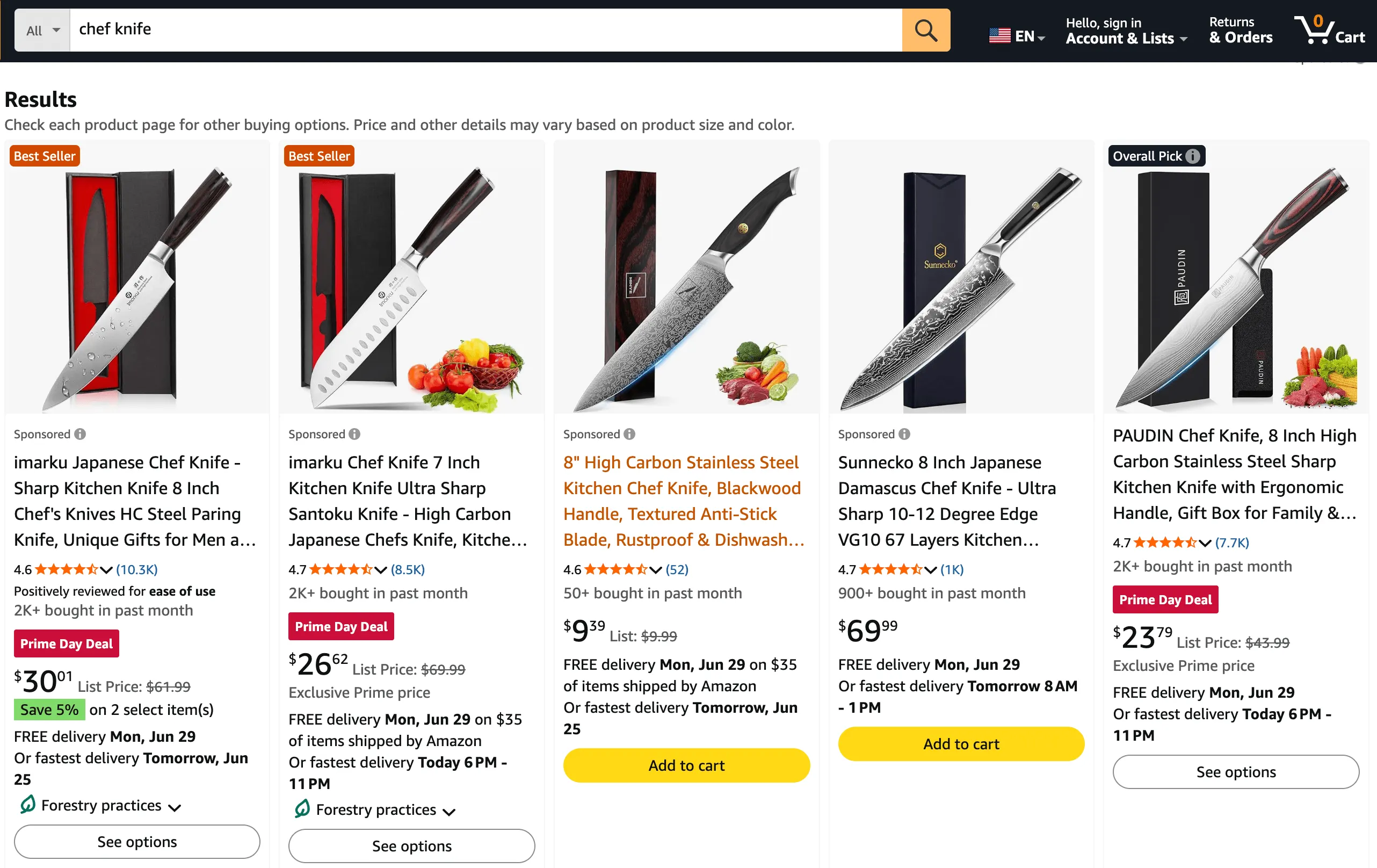
Each phrase in that title is a potential seed keyword: "Japanese Chef Knife," "Sharp Kitchen Knife 8 Inch," "Kitchen Gadgets," "Gyutou Knives."
You can do this manually for a few competitors, or use SellClaw's keyword research tool to batch-import competitor product URLs and extract keywords automatically. Instead of reviewing listings one by one, paste multiple competitor URLs and get the keyword set in seconds.
Use marketplace search suggestions
Type your main product term into the search bar on Amazon, Walmart, or Google. Before you hit enter, the dropdown shows autocomplete suggestions. These are the most frequently searched phrases related to your input.
For example, typing "chef knife" into Amazon's search bar might suggest:
- chef knife
- chef knife set
- chef knife bag
- chef knife set with bag
- chef knife sheath
- chef knife sharpener
- chef knife roll bag
- chef knife roll
- chef knife set professional
- chef knife set with roll bag
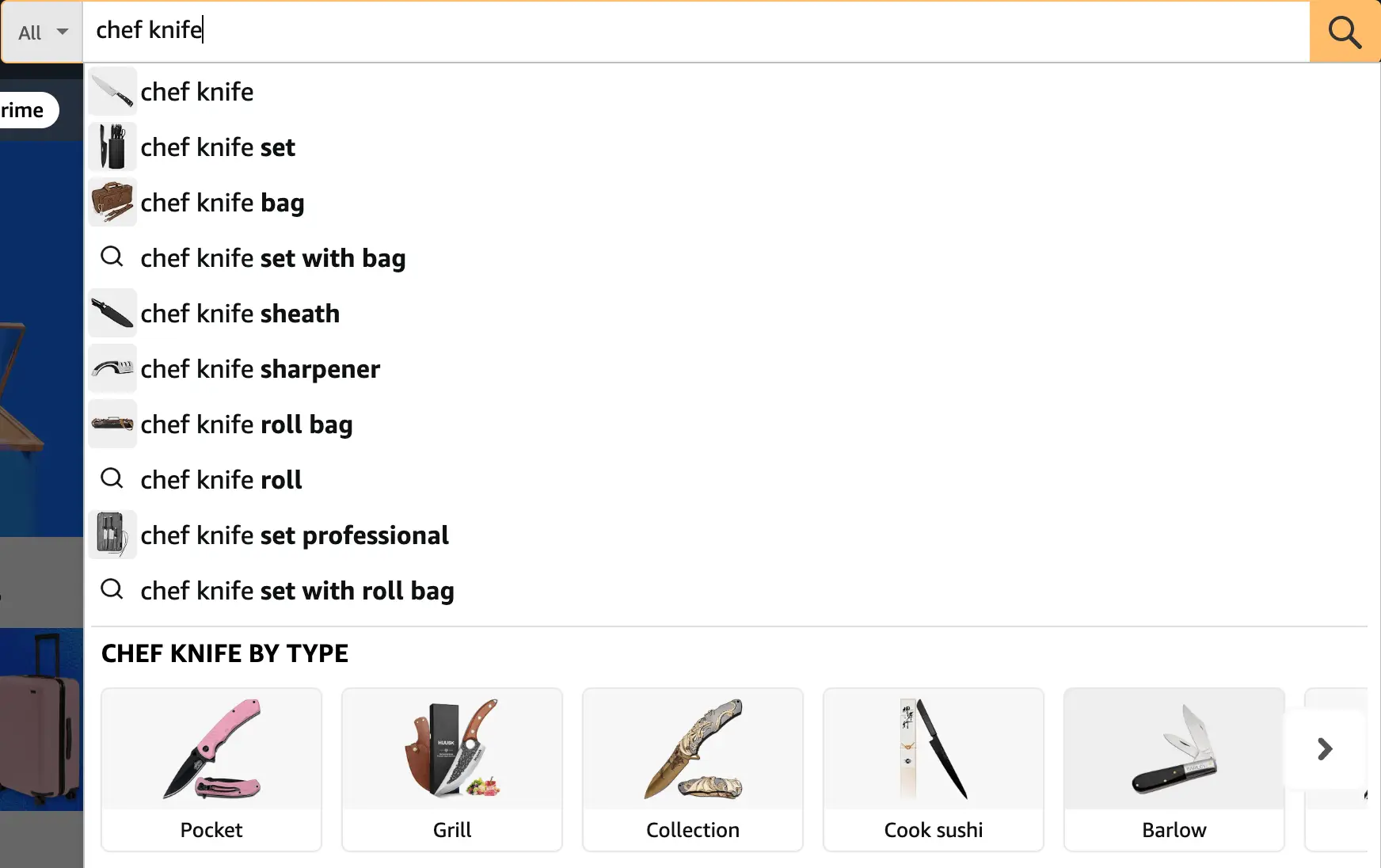
Each suggestion represents real buyer search behavior. These are not guesses — they are based on actual search frequency data.
Repeat this for different variations of your product term. Try plural forms, different word orders, and related descriptors. The autocomplete results change based on your input, so small variations can surface very different keyword ideas.
Check Google Trends
Google Trends shows the relative popularity of search queries over time. Enter your main product keyword — for example, "chef knife" — and you can immediately see how search interest fluctuates across months and seasons.
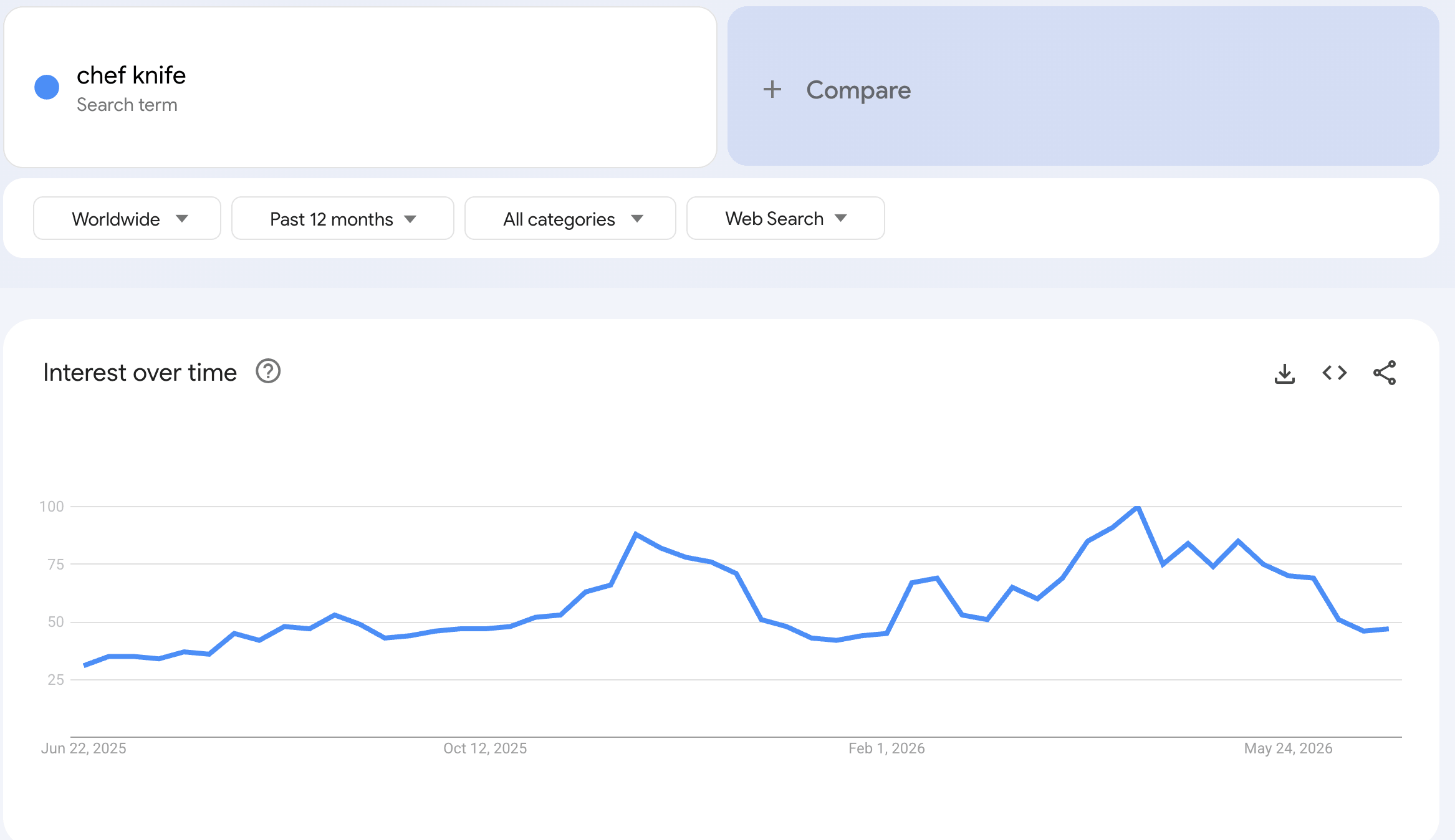
The trend chart helps you identify seasonal patterns. For example, you might notice that "chef knife" spikes around the holiday season when shoppers are buying gifts. Understanding these cycles lets you time your listing optimization and ad spend.
Beyond the trend line, scroll down to the "Related topics" and "Related queries" sections. These surface rising and top queries that real users are searching — many of which you would never think of on your own.
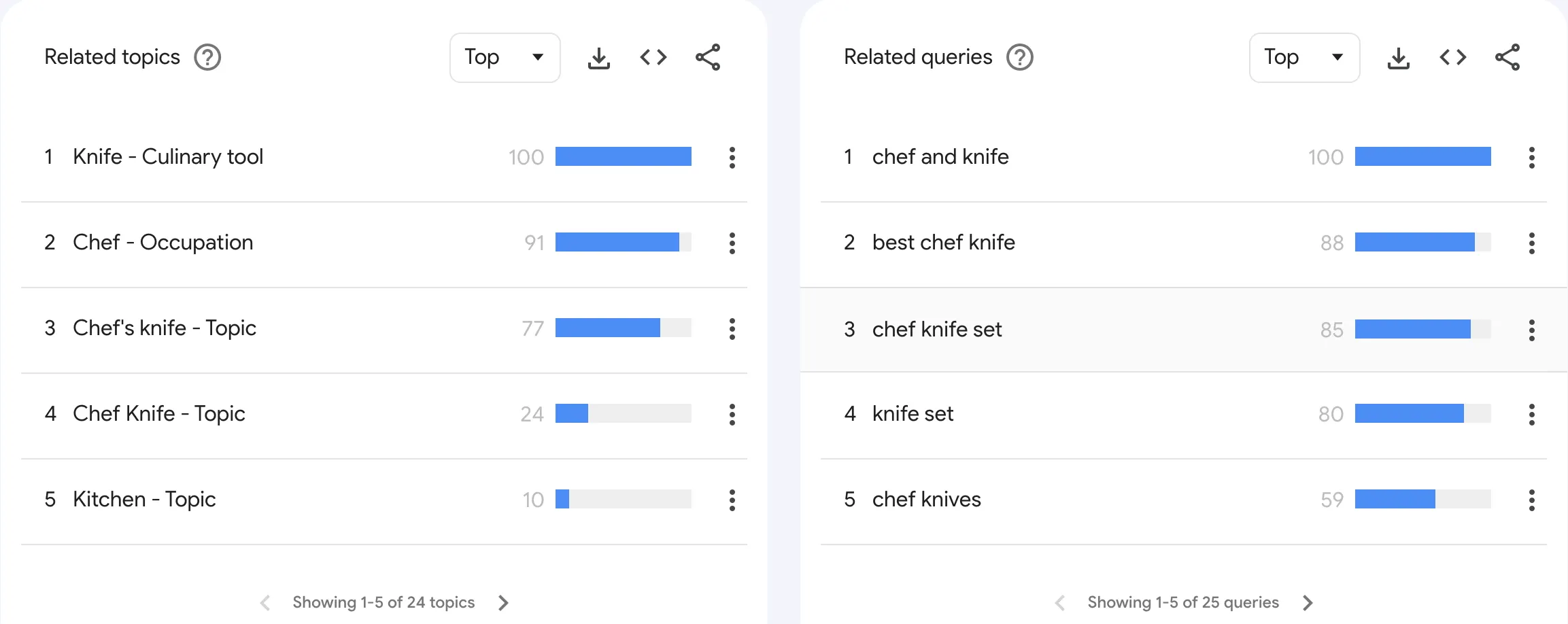
This is especially useful for:
- identifying seasonal keyword trends (e.g., "space heater" peaks in winter)
- finding emerging product terms before they become competitive
- comparing two keyword variations to see which has stronger demand
Google Trends does not give exact volume numbers, but it helps you validate whether a keyword direction is growing or declining and discover related terms worth adding to your seed list.
Brainstorm from your own product knowledge
Think about how your customers describe your products. What problem does your product solve? What features matter most? What materials, sizes, or use cases do buyers care about?
Write down every term you can think of, even if it seems obvious. These form the basis for the next step.
Step 2: Expand your keyword list
Seed keywords give you a starting point, but they are rarely enough. The real opportunity is in the long-tail variations, modifier combinations, and related terms that collectively represent the majority of search traffic.
Keyword expansion helps you move beyond the obvious phrases and surface terms you would never think of manually.
A practical expansion workflow:
- Take your seed keywords and run them through a keyword expansion tool
- The tool returns related keywords, longer-tail phrases, modifier variations, and semantically connected terms
- From a seed list of 20–50 keywords, you can often expand to hundreds or thousands of candidates
For example, the seed keyword "chef knife" might expand into:
- chef knife for beginners
- chef knife 8 inch german steel
- best chef knife under 50
- chef knife set with block
- japanese chef knife for vegetables
Each expanded keyword represents a slightly different buyer need. That specificity is what makes long-tail keywords so valuable — they convert at higher rates because the searcher knows exactly what they want.
In SellClaw, you can select multiple seed keywords and run keyword expansion directly. Choose your target region — Global, US, UK, or other markets — to get location-specific expansion results that match your selling market.
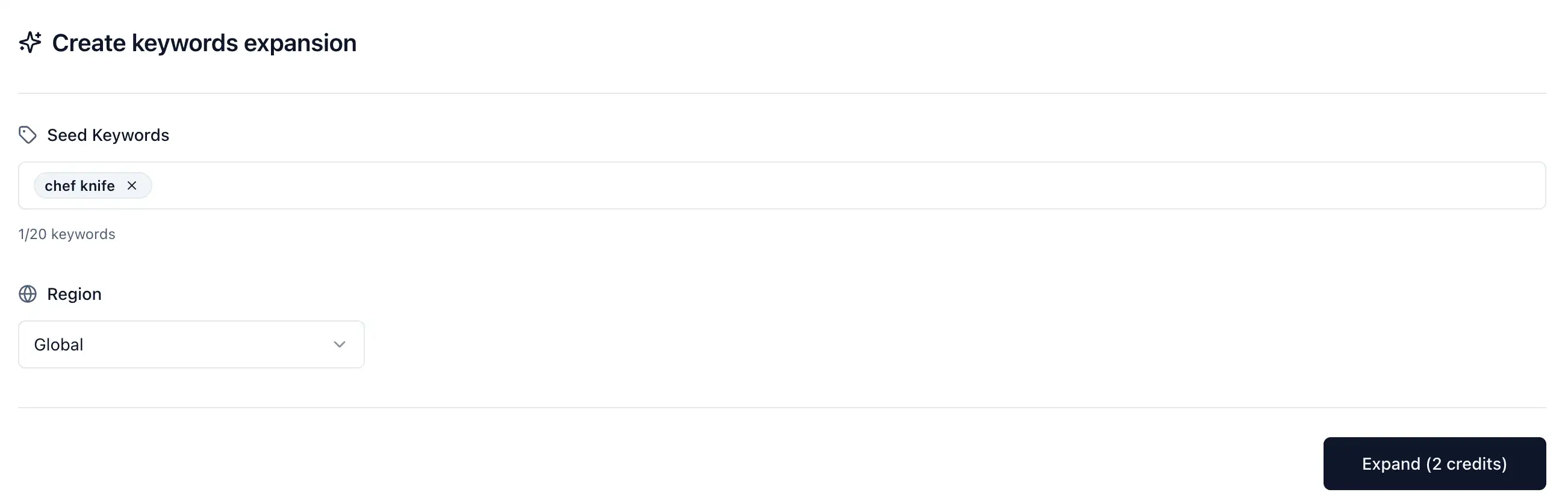
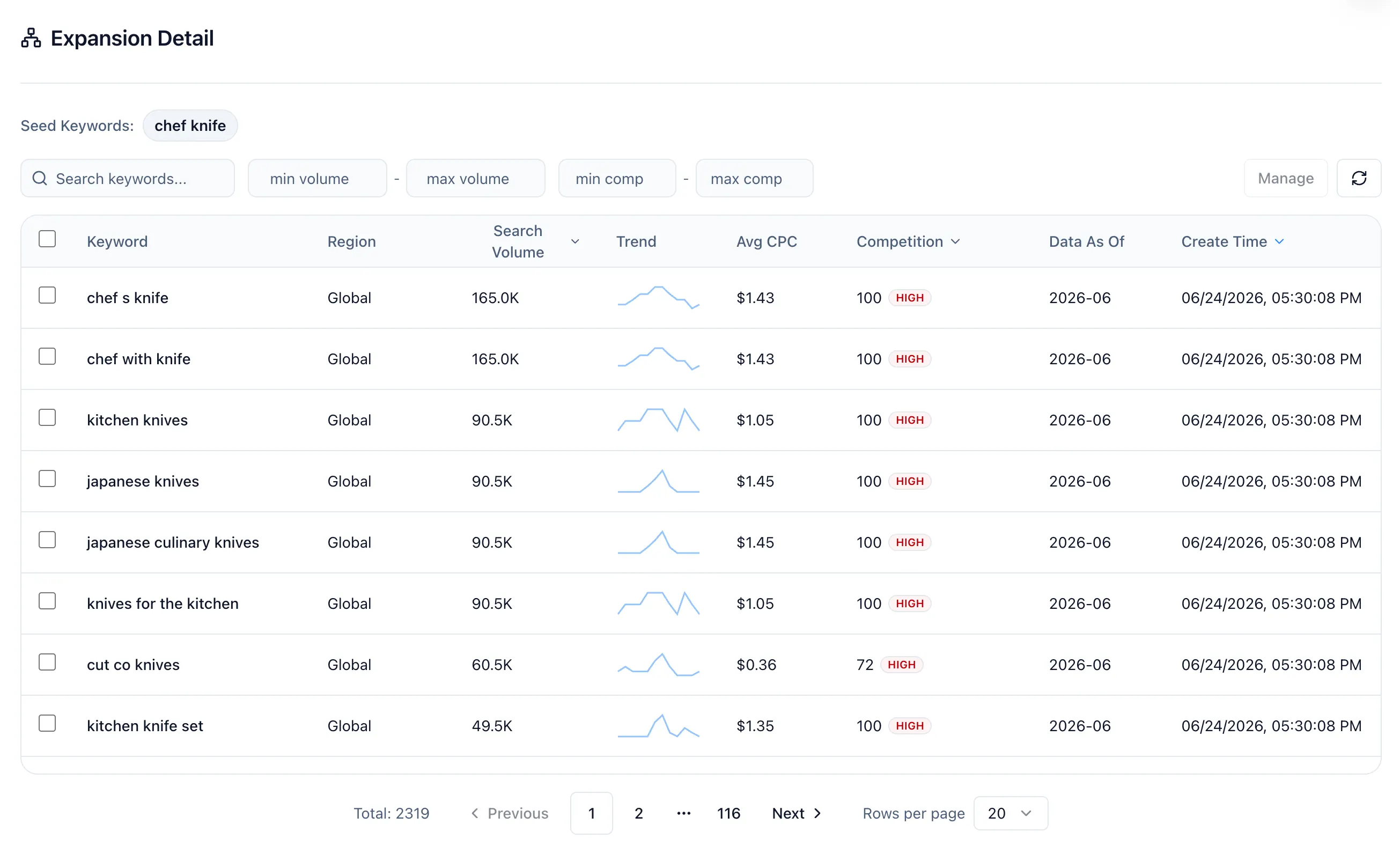
The expansion results can be substantial. For example, starting with a few chef knife seed keywords can return over 2,000 expanded keyword candidates, each with search metrics already attached. That gives you a large pool to filter from rather than guessing which variations are worth pursuing.
Step 3: Analyze keyword data
After expansion, your keyword list already comes with search metrics attached — search volume, CPC, competition level, and trend data. The next step is to analyze these metrics and filter down to the keywords that actually matter for your store.
The key data points to evaluate:
- Search volume — How many people search for this term monthly. Higher volume means more potential traffic, but also usually more competition.
- CPC (Cost Per Click) — How much advertisers pay for this keyword. Higher CPC often indicates stronger commercial intent.
- Competition level — How difficult it is to rank for this keyword. Lower competition means easier ranking opportunities.
- Trend — Is search demand growing, stable, or declining? Rising trends signal opportunity.
Use these metrics to sort and filter your expanded keyword list. For example, you can filter by minimum search volume to remove negligible terms, or sort by competition to surface the easiest ranking opportunities first.
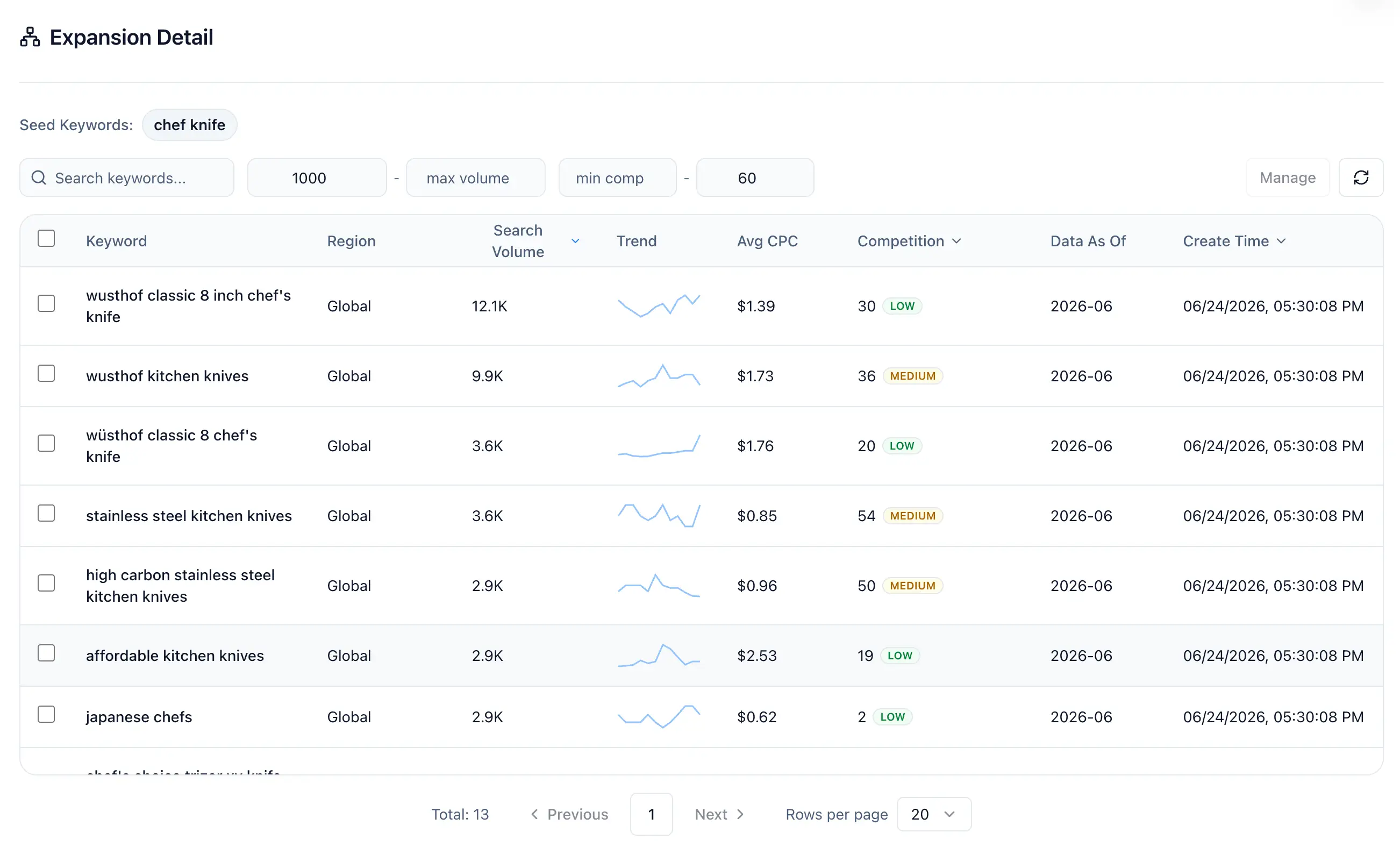
For example, when you filter for keywords with search volume greater than 1,000 and competition difficulty below 60, you might compare two keywords from your expansion results:
- "chef knife set" — 22.2K monthly searches, high competition(100)
- "stainless steel kitchen knives" - 3.6K monthly searches, medium competition(54)
- "wusthof classic 8 inch chef's knife" — 12.1K monthly searches, low competition(30)
The first keyword has more traffic potential but is extremely competitive. The last keyword is a niche term where you could realistically rank on page one within weeks. Both have value, but the data helps you prioritize where to focus first.
Step 4: Plan your product content around keywords
Keywords are only useful if you put them to work. The final step is mapping your filtered keywords to specific pages and content elements on your store.
Create multiple listing variations for long-tail keywords
One of the most effective ecommerce keyword strategies is creating multiple product page variations or content pages, each targeting a different long-tail keyword cluster. Instead of trying to rank one page for every keyword, you create focused pages that match specific search intent.
For example, if you sell chef knives, you might create separate optimized pages for:
- "wusthof kitchen knives"
- "affordable kitchen knives"
- "high carbon stainless steel kitchen knives"
Each page targets a different buyer segment with different language and intent. This approach dramatically increases your total search visibility.
Optimize key page elements
For each product page, ensure your target keywords appear in these critical locations:
Meta title and meta description — These appear in search results and directly influence click-through rate. Include your primary keyword naturally in both. Keep titles under 60 characters and descriptions under 155 characters.
Product title (H1) — Your main heading should contain your primary keyword. This is the strongest on-page SEO signal. Make it read naturally for buyers while including the target term.
Product description and bullet points — Weave secondary keywords throughout your product description. Do not stuff keywords — write for the buyer first and include terms where they fit naturally.
Heading structure (H2, H3) — Use subheadings to organize your content and include relevant keywords. Good heading structure helps both search engines and shoppers scan your page.
Image alt text and file names — Every product image should have descriptive alt text that includes relevant keywords. Name your image files descriptively too (e.g., "wireless-noise-cancelling-headphones-black.jpg" not "IMG_4521.jpg").
Internal links and navigation — Link between related product pages using keyword-rich anchor text. This helps search engines understand your site structure and distributes ranking authority across pages.
Match content to search intent
For each keyword, ask: "What does someone searching this term actually want to see?" Then make sure your page delivers exactly that. If the keyword implies a comparison, include a comparison section. If it implies a specific use case, highlight that use case prominently.
Step 5: Continuously expand your keyword universe
Keyword research is not a one-time task. Markets shift, new products emerge, seasonal trends create temporary opportunities, and buyer language evolves. The sellers who consistently grow organic traffic treat keyword research as an ongoing process.
Build the habit of:
- Adding new seed keywords monthly — As you learn more about your market, new keyword directions emerge. Competitor launches, customer questions, and product reviews all surface new terms.
- Re-expanding quarterly — Run keyword expansion on new seeds and updated competitor data. The search landscape changes, and expansion tools pick up new related terms over time.
- Monitoring keyword performance — Track which keywords are driving traffic and conversions. Double down on what works and prune what does not.
- Filling content gaps — As you discover new keyword opportunities, create content to capture them. Each new optimized page is another entry point for organic traffic.
The compounding effect is real. A store with 50 well-optimized pages capturing long-tail traffic will outperform a store with 5 pages targeting only head terms. Each page you add expands your total addressable search traffic.
Over time, this process helps you build a keyword moat — a broad, deep set of rankings that competitors cannot easily replicate. That is how you create sustainable organic growth and reduce your cost of customer acquisition.
Common mistakes in ecommerce keyword research
Sellers frequently make these errors:
- Targeting only high-volume head terms — These are the hardest to rank for and often have lower conversion rates. Balance head terms with long-tail opportunities.
- Ignoring buyer intent — Volume without intent does not drive sales. Always evaluate whether a keyword signals purchase readiness.
- Keyword stuffing — Cramming keywords into your content unnaturally hurts readability and can trigger search engine penalties. Write for humans first.
- Ignoring GEO (Generative Engine Optimization) — AI-powered search engines like Google SGE and ChatGPT search are reshaping how buyers find products. The foundation of GEO is still SEO — well-structured content, clear keyword targeting, and authoritative pages. If your keyword strategy and on-page SEO are solid, you are already building for the AI search era.
- Researching once and never updating — Markets change. A keyword strategy from six months ago may already be outdated.
- Not validating with data — Gut feelings about which keywords matter are unreliable. Always let search volume, competition, and CPC data guide your decisions.
- Copying competitors blindly — Competitor keywords are a starting point for discovery, not a strategy to copy wholesale. Filter for what actually fits your products and positioning.
Summary
Effective ecommerce keyword research follows a clear process:
- Find seed keywords from competitor analysis, search suggestions, and Google Trends
- Expand seeds into a comprehensive keyword list using expansion tools
- Analyze keyword data — volume, CPC, competition, and trends — to filter for high-value terms
- Map keywords to product pages and optimize titles, descriptions, headings, images, and internal links
- Continuously expand your keyword universe to capture more organic traffic over time
This is not a one-time project. It is an ongoing system that compounds results the longer you maintain it. Each keyword you rank for is a permanent free traffic channel — and that is how successful ecommerce stores reduce their reliance on paid ads and build sustainable organic growth.